Process modeling is a powerful tool to capture and automate the real-world complexity of organizational workflows, and BPMN 2.0 (Business Process Model Notation) is the most common representation in which to do so. In a previous article, we have illustrated that BPMN modeling and process execution can be decoupled, and discussed when doing so makes sense in practice. In this article, we will look deeper at the practical challenges of building a BPMN modeling UI.
From a distance, building a BPMN modeler UI looks like a straightforward front-end engineering problem. You may already be thinking: "The notation has a finite set of shapes, the shapes have known visual representations, and the output format is a well-defined XML schema. How difficult can this be?"
In reality, teams that attempt to build a custom BPMN modeling UI from scratch discover that the apparent simplicity of the task is misleading. Putting BPMN shapes on the screen, letting users interact with them in BPMN-constrained ways, and integrating with execution engines are three specific challenges that involve general diagramming complexity and BPMN-specific considerations which are easy to underestimate.
We navigated these technical obstacles ourselves while building a production-oriented BPMN editor on top of the JointJS library. As we explain in the "Choosing the right foundation" section, a general-purpose diagramming library such as JointJS is able to cover the hardest parts of the problem for you out-of-the-box while still offering the kind of customizability that is required for delivering full-featured professional products.
Although these are real obstacles, you should not let these challenges discourage you from building a custom BPMN modeler UI. Instead, knowing them ahead of time lets you scope the work correctly – and scoping the work correctly lets you arrive at a crucial conclusion:
These challenges mean that you need to start with the right foundation.
Let us explain what we mean by that.
The rendering architecture of your modeler UI must be designed carefully from the start, because every other feature depends on it.
Before you can place and manipulate a single BPMN shape on the screen, your application needs to implement a substantial amount of foundational supporting architecture. This includes the concept of a graph (the data layer of your diagram, i.e. the layer that contains information about all shapes and their visual attributes and logical properties), the concept of a paper (the visual layer, i.e. the layer that deals with rendering shapes to the screen and converting between local and client coordinates), the infrastructure to support two-way data binding between the data layer and the visual layer, and a framework for handling user interaction with shapes.
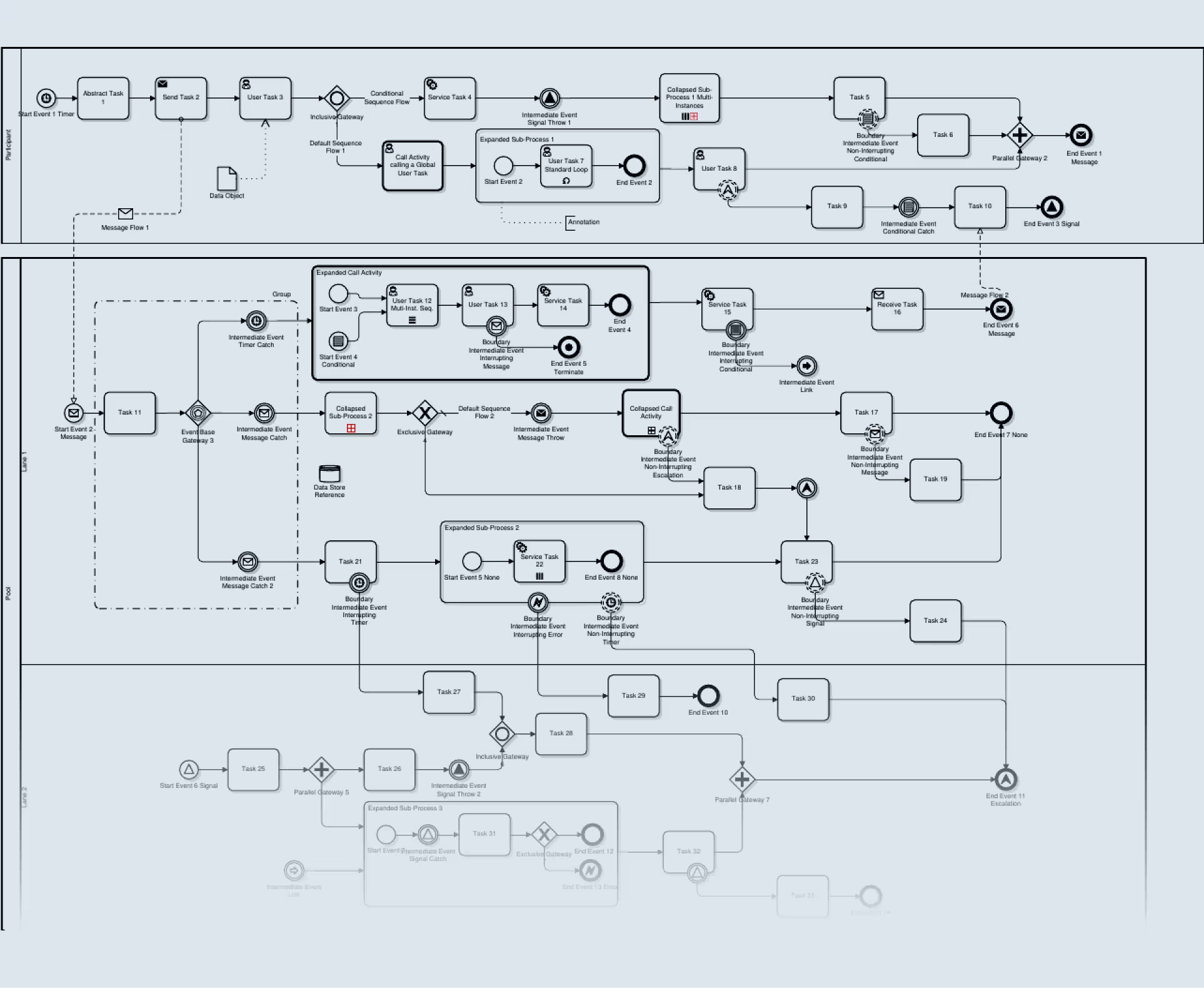
First, ensuring high performance of your application is crucial – and tricky to achieve if you are a newcomer to diagramming. Although you are free to choose whichever rendering technology you like, the biggest players on the market (including bpmn-js and JointJS) rely on SVG since it offers clear advantages for accessibility, CSS styling, per-element event handling, and developer experience. The danger is that using unoptimized SVG may cause performance problems when you start working with diagrams with more than around a thousand elements – which might only occur late in the development process, when redesigning the rendering architecture is significantly more expensive.
This is one area where a mature general diagramming library can provide immediate value – for example, JointJS uses virtual rendering technology out-of-the-box which allows your application to handle extremely large diagrams by dynamically unloading elements as they leave the user's viewport.
Second, most developers' mental model of BPMN includes only a handful of elements: start events, end events, tasks, gateways, and sequence flows to connect them. In reality, the full BPMN 2.0 specification defines over 100 distinct symbols, each of which has its own visual representation. All of these shapes need to be supported by your modeler UI, and that represents significant design investment – unless you rely on a library that provides the complete shape library for you out-of-the-box.
You may decide to support only a curated subset of BPMN instead – after all, most real-world workflows only use a fraction of the BPMN specification – and defer implementing the rest of the BPMN specification "for later" (as we discuss in the "Palette curation" section). However, even then, there is a high chance that your users will come back to you with requests to support functionality that would force you to re-architect the core of your solution after the fact:
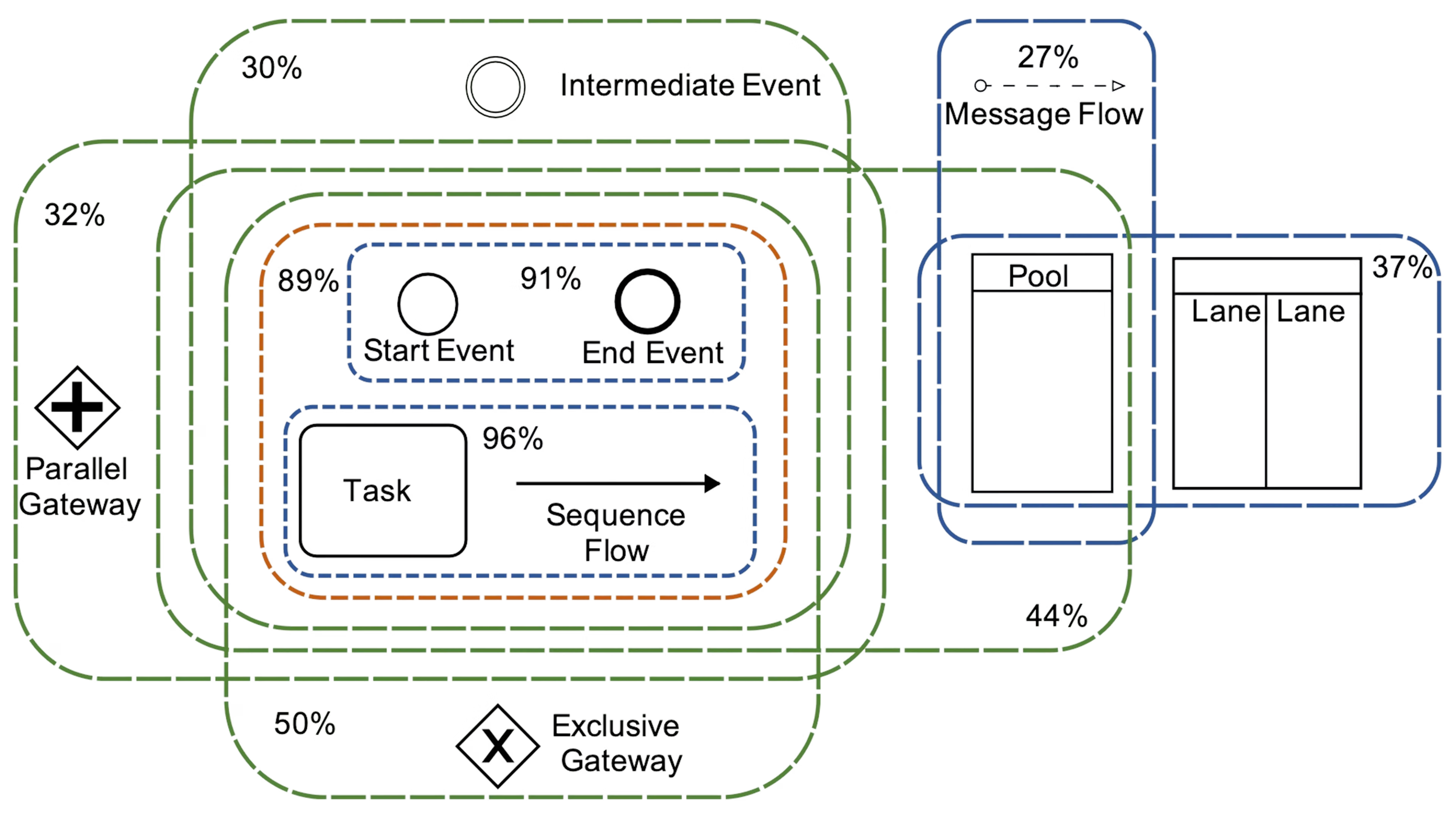
The problem is that BPMN pools define a containment hierarchy (i.e. a pool may contain lanes, and pools or lanes may contain flow objects), and that any objects contained within a pool and/or a lane must move with the containing object whenever it is dragged. However, supporting parent-child relationships like these requires implementing a graph structure that is substantially more complex than a flat node-and-edge diagram – like what JointJS achieves with its embedding functionality.
Apart from defining a rich shape library, BPMN also defines a wealth of semantic rules (where each element may appear and how it may connect to other elements), which must be supported by the modeler UI at interaction time. Basic domain-specific restrictions of BPMN include the requirements that start events must have no incoming sequence flows and must have exactly one outgoing flow, whereas end events must have no outgoing flows, or that boundary events must be attached to activities, never to gateways or events.
Meanwhile, the restrictions around pools and lanes may serve as an illustration of the more complex constraints which apply to a BPMN process:
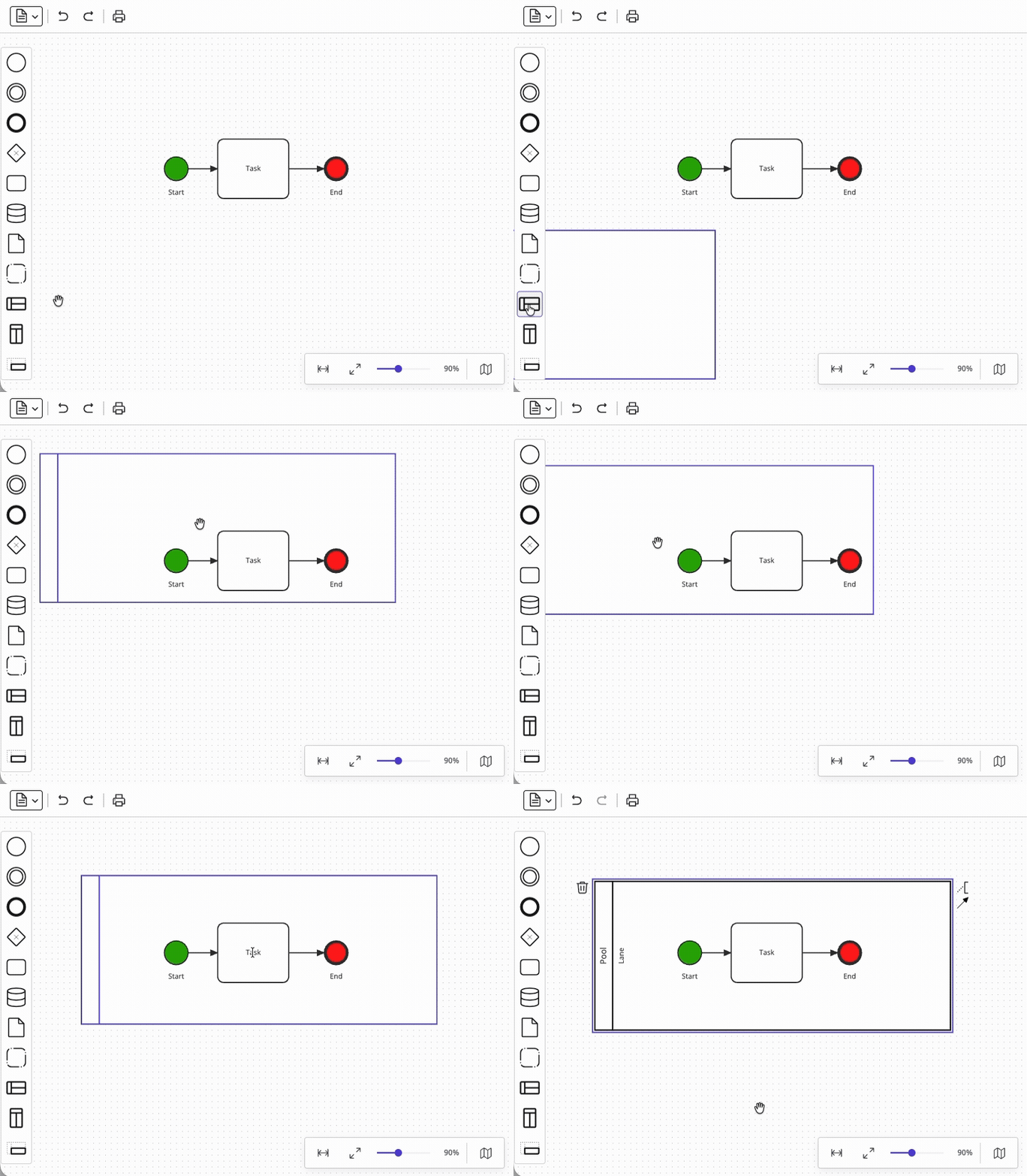
Relying on a solution that implements most of these interaction restrictions for you allows you to skip weeks of debugging of your application.
.avif)
User experience complexity compounds quickly in diagramming tools, and doubly so for BPMN.
Several basic features of BPMN modeler UI actually require deep foundational infrastructure to be in place, even though they look simple to implement at first glance. The problem is that significant obstacles often only get discovered late in development, which may lead to delays and/or last-minute scope adjustments.
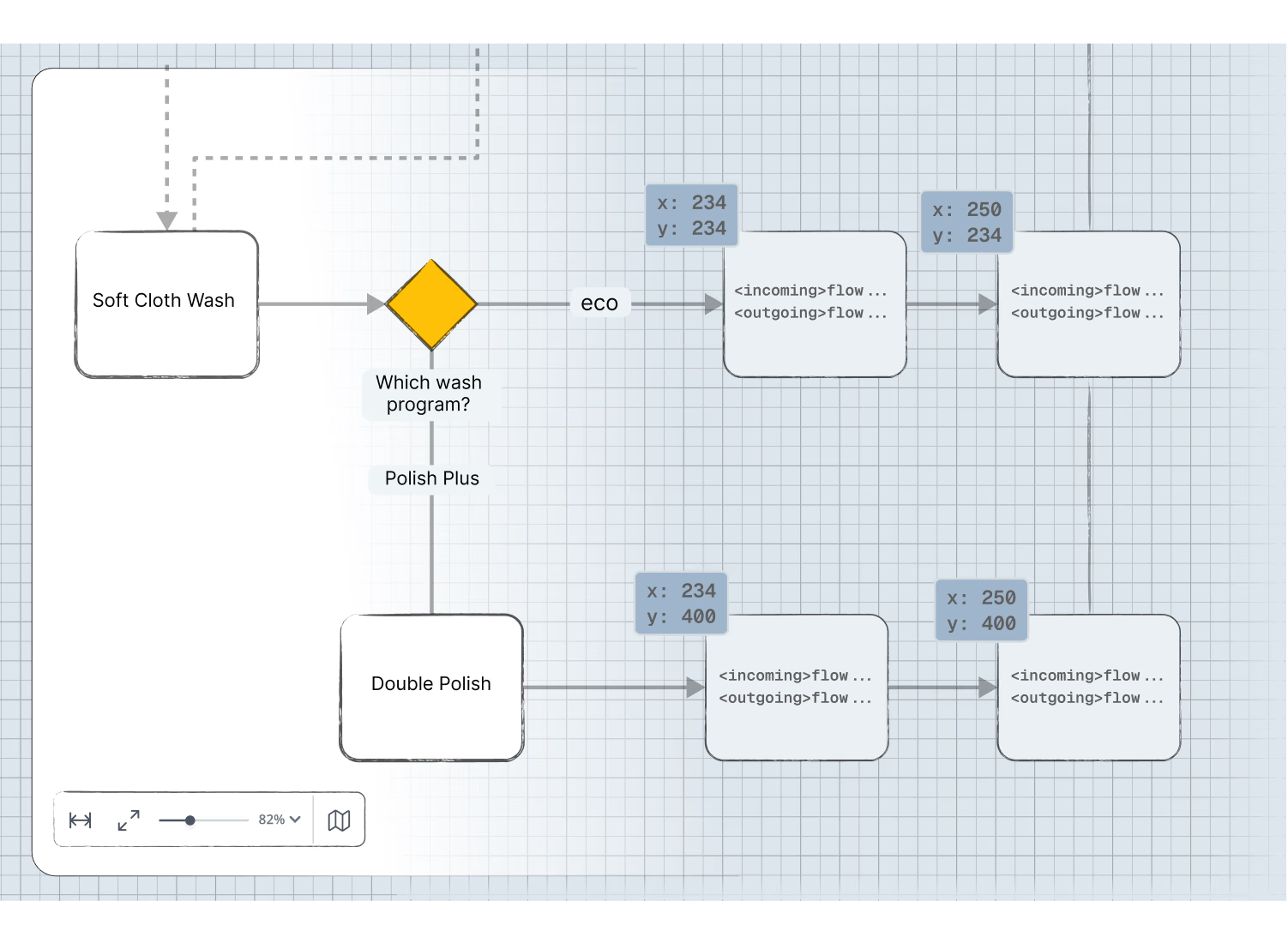
Even though supporting zoom and scroll seems like a natural extension of the diagram paper (introduced in challenge 1), it introduces a whole new level of abstraction. The simple metaphor that client coordinates map one-to-one to graph coordinates no longer applies – the scale and origin of the transformation now change dynamically depending on zoom level and scrolling position.
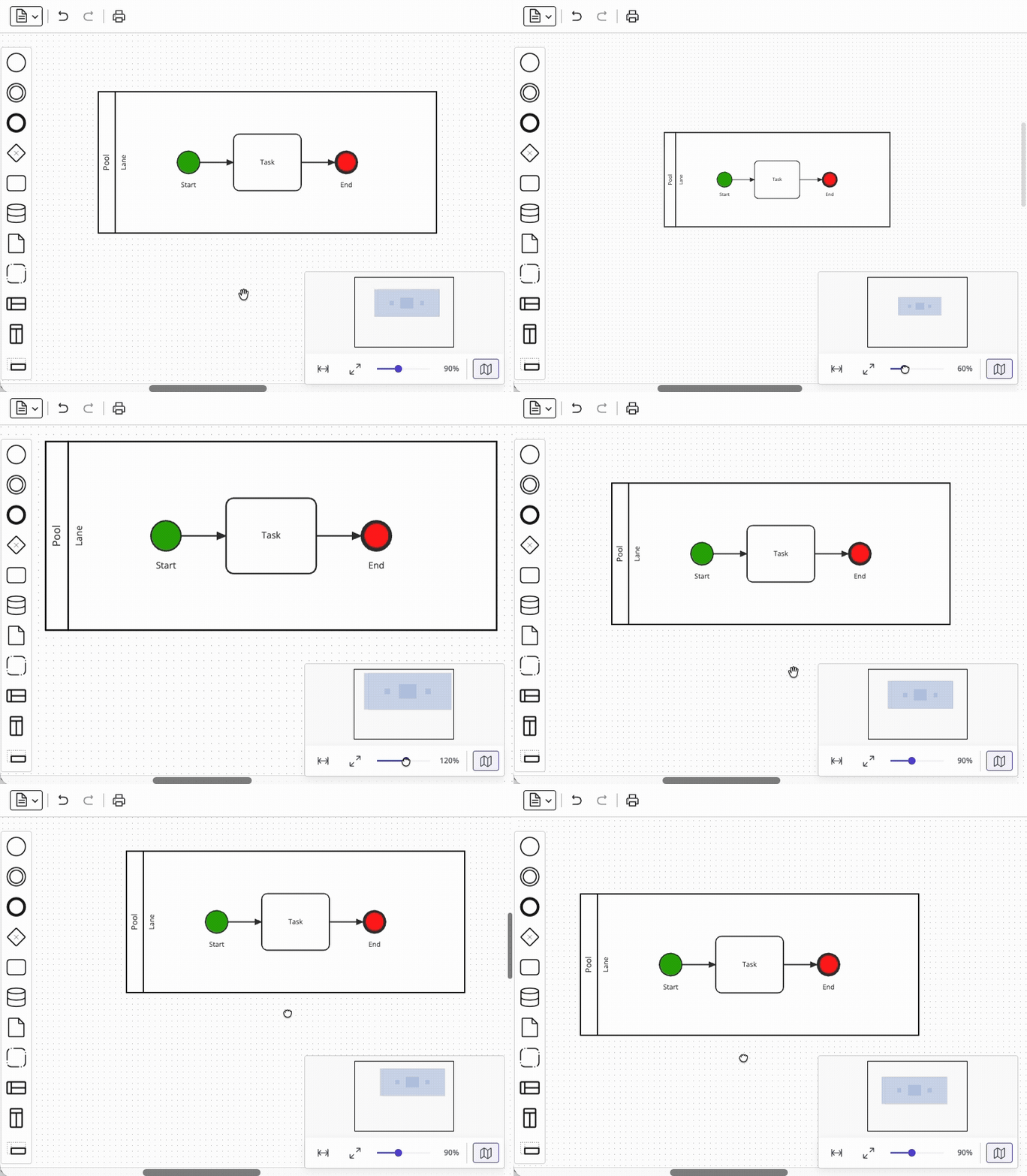
On top of that, common additional requirements like scrolling of the paper while dragging an element, laying out content in predefined page areas, supporting pinch and pan gestures, and enabling inertial movement each pose their own architectural challenges. JointJS offers this functionality out-of-the-box with the Paper scroller component, which acts as a wrapper for the visual diagram.
Another area that looks deceptively simple is link routing – connecting two shapes with a line. You may be thinking that "it’s just a line between two shapes," but in reality, the requirement is never just about a connecting line.
At a minimum, BPMN diagrams require support for:
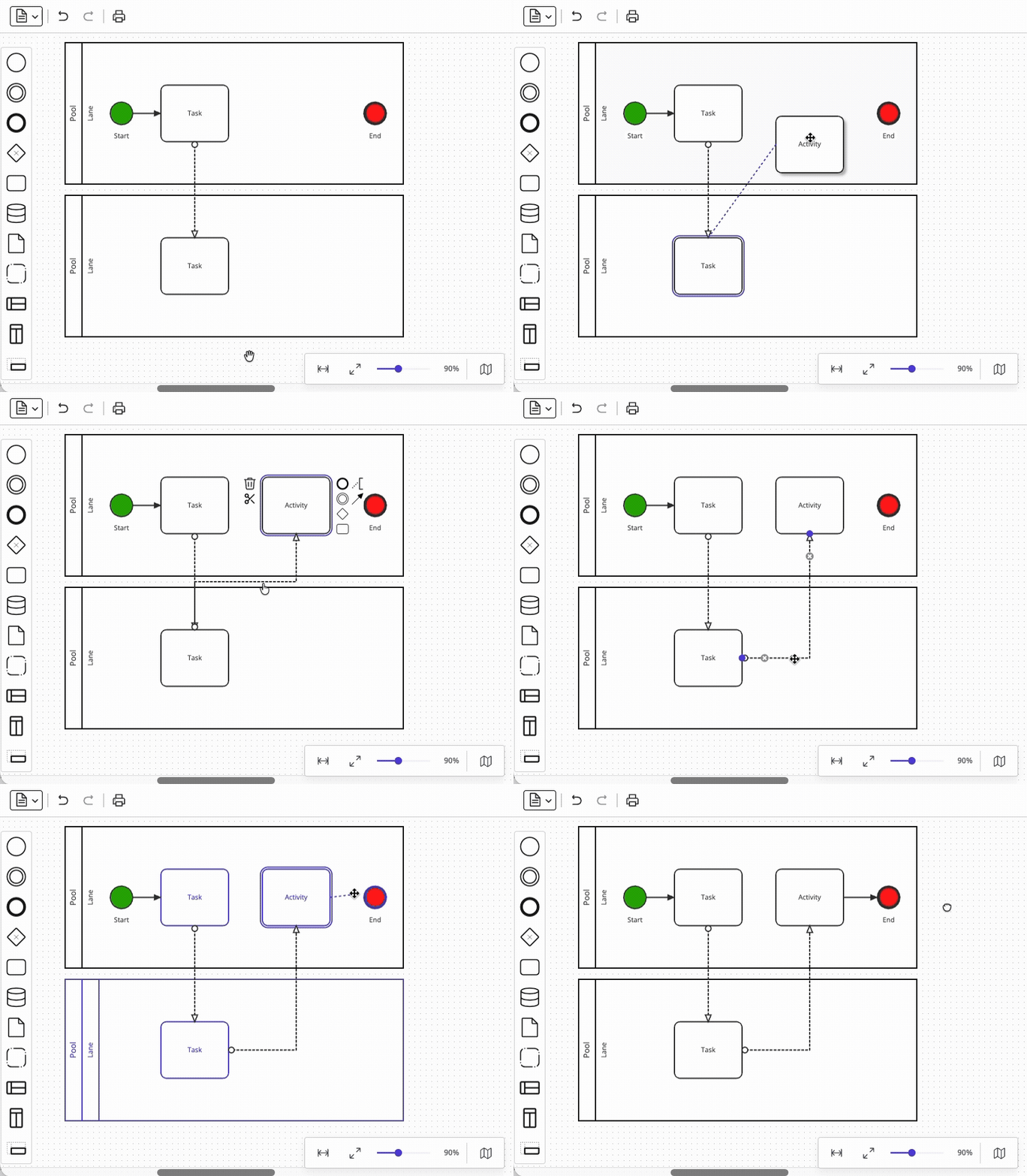
Each of these sub-features interacts with the others in various ways, and our team estimated that the effort to implement the full scope of link routing is comparable to the effort to implement the rendering foundation itself – that is, very large – so using a diagramming foundation like JointJS to do this for you is a very good idea.
Getting elements onto the canvas in a way that feels polished is itself a deceptive challenge. It is true that the native HTML Drag and Drop API offers a straightforward path for simple cases – it supports draggable elements, valid drop targets, custom drop effects, and even creates a preview of the dragged item automatically. But diagramming applications require finer control over the position of the dragging preview than the native API provides, so that the position of the dragged element can be aligned with the underlying paper grid. Resolving this limitation, in order to support tight integration between the paper layer and the element palette, requires sidestepping the native API and reimplementing the drag-and-drop functionality from scratch – the approach used by JointJS and other diagramming libraries.
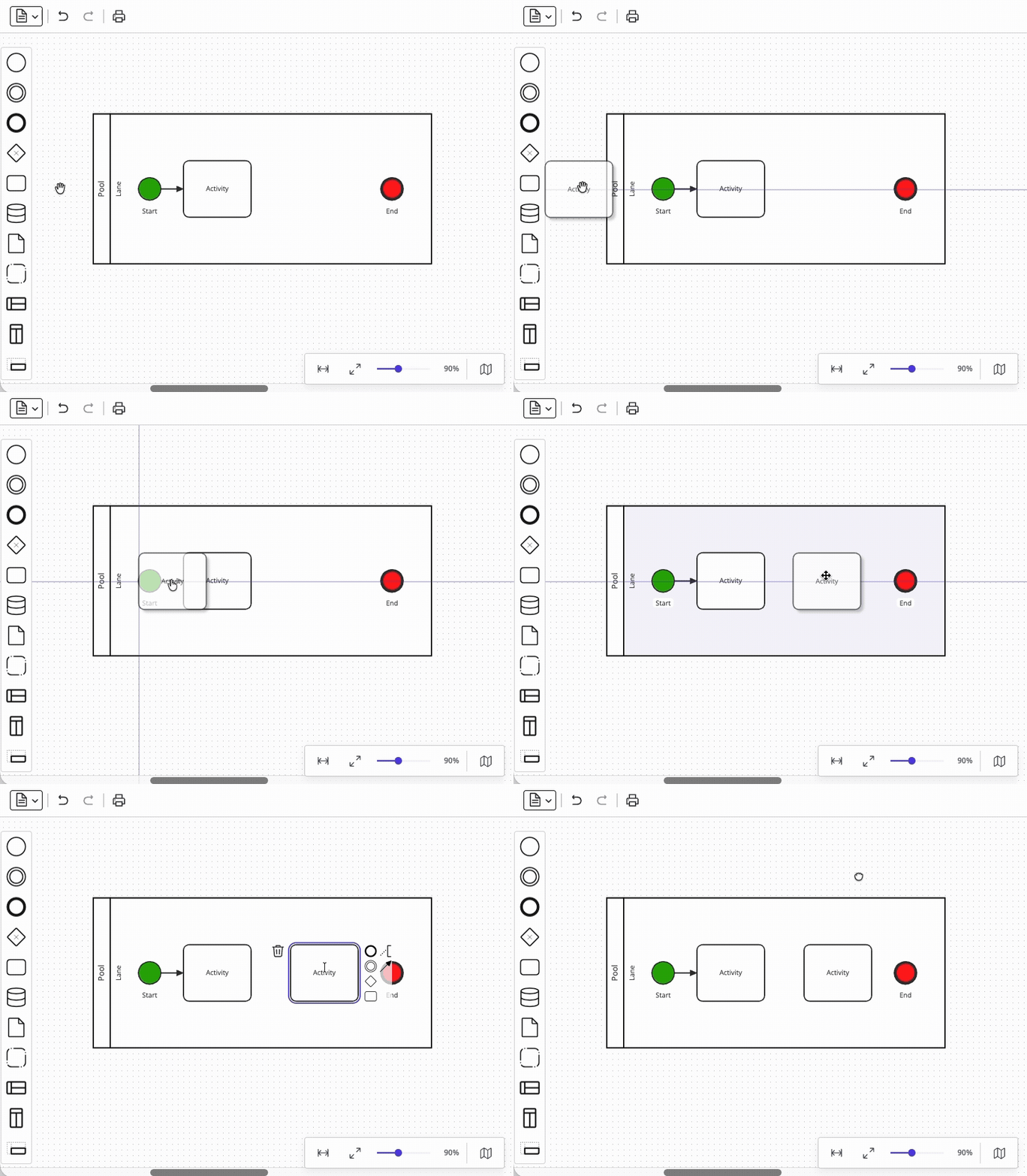
Closely related are snaplines – visual alignment guides that let users position elements neatly relative to each other. Your users already expect this behavior from every productivity tool they use (word processors, presentation programs, design tools), so its absence would be felt immediately. However, supporting midpoint alignment and edge alignment between elements is only the first step – the real difficulty comes from integrating snaplines with element drag-and-drop from the palette. In fact, even if you managed to satisfy all your dragging requirements via the native API up to this point (see above), the snaplines feature would force you toward a custom dragging implementation anyway – a limitation that risks being discovered too late. Mature diagramming libraries handle this functionality out-of-the-box.
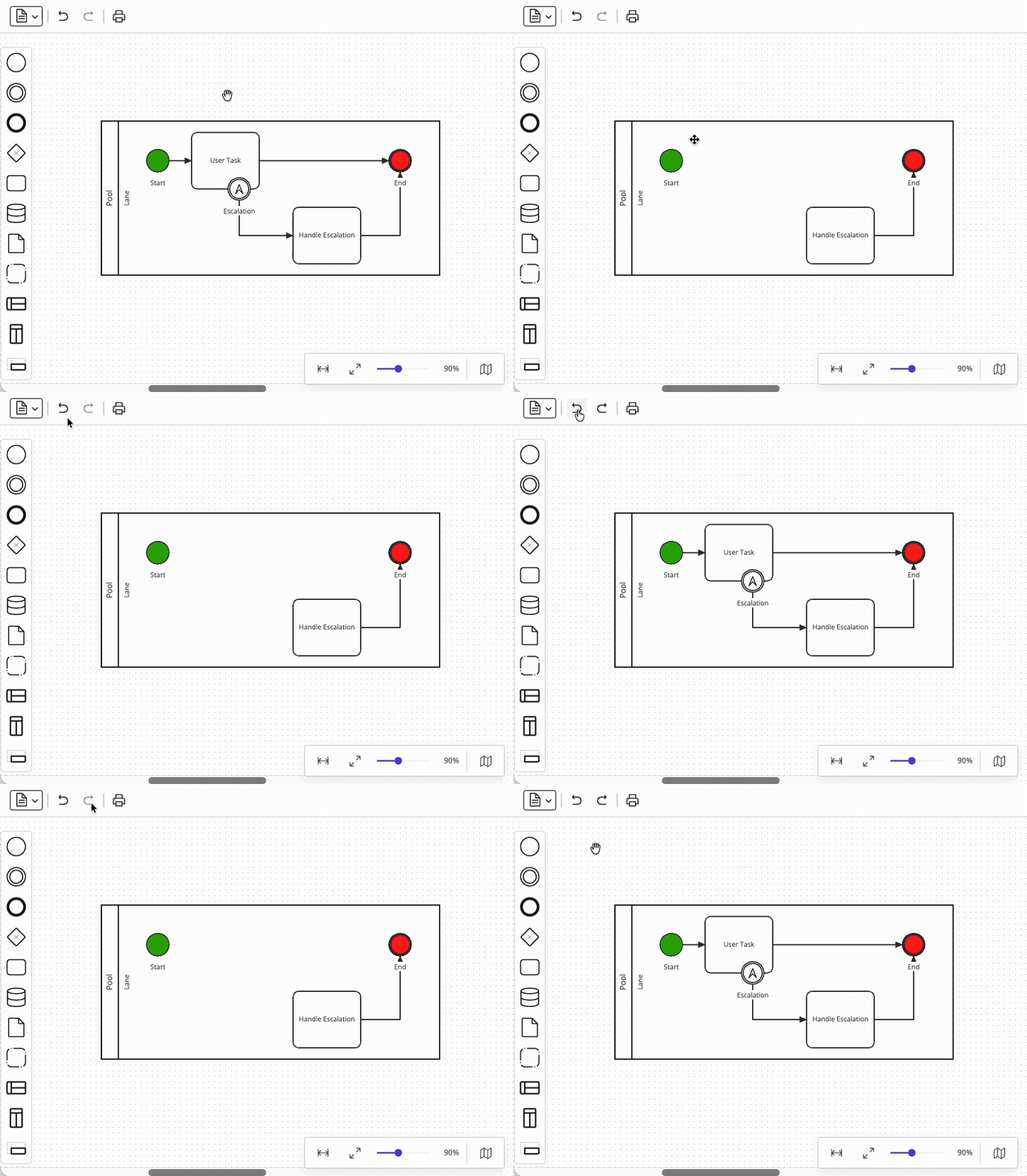
Supporting undo/redo functionality in your modeling UI sounds straightforward until you consider compound operations. A single user action (such as deleting a task) may involve removing an element, removing all of its connected sequence flows, detaching boundary events, and perhaps even updating the parent container's layout – all of which must be reversed as a single atomic operation. Diagramming libraries including bpmn-js and JointJS address this challenge with command grouping capabilities, but a custom modeler UI would need to implement this functionality independently.
With the foundational UX infrastructure in place, BPMN imposes its own scope decisions. As we mentioned in the "Over 100 BPMN symbols" section, BPMN's broad library is an asset for the standard but a liability for your users. For most real-world process modeling, it is enough to rely on a small, well-defined subset of BPMN elements – but deciding which elements to include, how to organize them, and how to label them requires domain knowledge that goes beyond BPMN expertise.

For example, in our Camunda integration demo, we trimmed the element palette (on the left in the screenshot above) to just the elements our workflows needed: start event, end event, service task, HTTP connector, exclusive gateway, timer/error boundary events, and sequence flow. This way, we also avoided surfacing BPMN shapes from the original BPMN editor demo which Camunda 8 does not support, such as conditional events, multiple events, or complex gateways.
Property panels are the area where much of the BPMN-specific interaction complexity is concentrated. The BPMN specification defines a broad array of configurable attributes for each element type, and engine-specific namespaces add even more on top of that (plus whole extension elements). For example, a fully specified HTTP connector task in Camunda 8 requires fields for URL, HTTP method, request headers, request body, connection timeout, read timeout, result variable, result expression, error expression, retry count, retry backoff, and I/O mappings. Presenting these in a way that is understandable to the target user audience – especially when those users may not be developers – is a significant design challenge. Grouping, ordering, conditional visibility, inline validation, and contextual help all shape how your modeling UI will be received by your users.
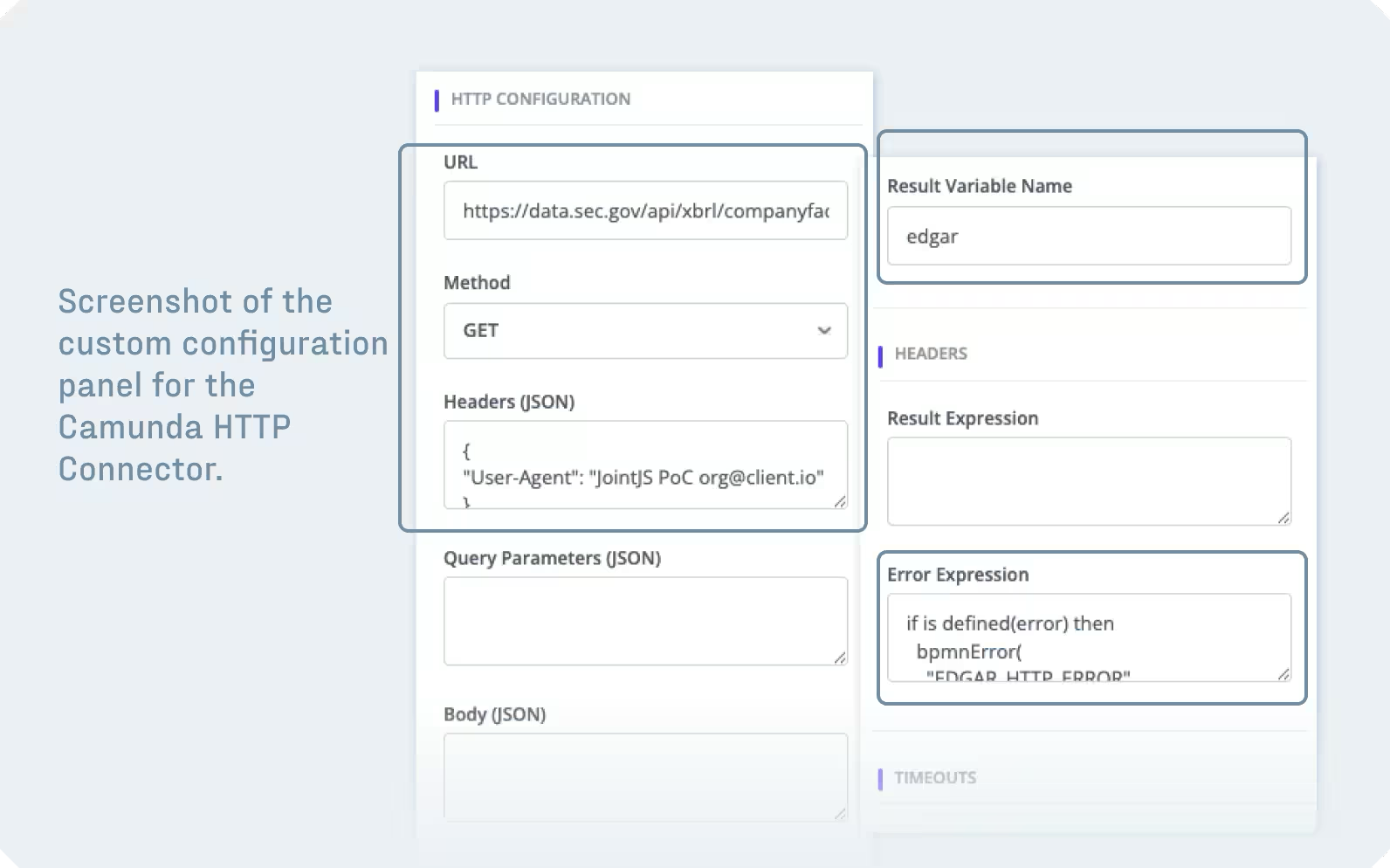
Building this functionality from scratch would mean implementing an intricate form system that supports different input types, validation and input patterns, readonly fields, and conditionally hidden fields (fields that become visible based on other fields' values), at a minimum. The complications pile up quickly as business logic requirements accumulate. JointJS addresses this challenge with its Inspector component – a property editor that is fully integrated with the graph layer of your diagramming application.
.avif)
Engine integration is where your real differentiation comes from.
The challenges described so far concerned the diagramming foundation and BPMN-specific UX – areas where a mature library like JointJS can do the heavy lifting for you. The remaining challenges lie in the integration layer between your modeler UI and your target execution engine. These are areas where your team will need to invest custom engineering effort regardless of the foundation you chose – but at least the work needed here is well-understood once you know what to expect.
The BPMN 2.0 standard was designed with a two-layer architecture – a semantic layer defining process logic, and a visual layer storing diagram layout (diagram interchange) – and in principle, any compliant modeler should be able to produce XML that any compliant engine can execute. However, since the details left unspecified intentionally included many execution-relevant details, individual engine implementations came to use proprietary extension namespaces with fundamentally different structures, expression languages, and configuration models.
The XML required to set up a service task to send an email looks completely different when targeted to Camunda 8 (and its Zeebe engine) versus Camunda 7 (and its older Camunda engine) or Flowable. The practical consequence for modeler UI development is that producing spec-compliant BPMN 2.0 XML is not sufficient. Your modeler must also generate the correct extension elements – in the correct namespace, and with the correct structure – for the specific engine that will run the process. Our Camunda integration tutorial covers building such an engine-specific extension layer in detail.
Furthermore, one of the hardest challenges in custom BPMN modeler development is round-trip safety – the ability to import a BPMN XML file, let the user make changes, and export the file again without losing information that the modeler does not natively understand. As explained above, the problem arises because BPMN XML files in the wild contain other content besides standard BPMN 2.0 elements (such as engine-specific extension elements, custom attributes, documentation nodes, and metadata from other tools). When a diagramming library imports such XML, it typically parses the standard BPMN elements and silently discards everything else. This is a well-documented problem across the BPMN ecosystem, not unique to any one library.
In our Camunda integration demo, we solved this challenge by building a three-phase pipeline that extracts the engine-specific data from the XML before import, marks elements with custom attributes so the importer instantiates the correct shape classes, and then restores the extracted properties onto the JointJS model after import:
async function loadProcessIntoCanvas(context, process) {
  const response = await fetch(`http://localhost:3000/api/process-xml/${process.processDefinitionKey}`);
  const { bpmnXml } = await response.json();

  const xmlDoc = new DOMParser().parseFromString(bpmnXml, 'application/xml');

  const extensions = extractZeebeExtensions(xmlDoc); // 1. Extract
  markHttpConnectorsInXML(xmlDoc, extensions); // 2. Mark
  await xmlFileImporter.import(asFile(xmlDoc), paper.model);
  restoreZeebeExtensions(paper, extensions); // 3. Restore
}
Note that other libraries handle this challenge differently – for example, bpmn-js uses a bpmn-moddle extension mechanism that teaches its parser to recognize and preserve specific XML namespaces – but the general problem is universal. Any modeler that does not have built-in knowledge of every possible engine extension will need a strategy for preserving unrecognized XML through the round trip. Make sure you budget for appropriate development and debugging effort in this area!
Validation is a BPMN-specific challenge that has to be considered in the integration layer between your solution and your target execution engine. Engines reject processes they consider invalid at deployment time, so it is the responsibility of your modeling UI to warn the user if their BPMN process has issues that they need to fix.
Apart from the interaction constraints of BPMN we already mentioned (see challenge 1), your modeler UI also needs to consider specific schema-level restrictions, some of which are inconsistently enforced by execution engines (e.g. that all flow objects must precede BPMN artifacts in the exported XML). This means that a modeler often cannot simply output elements in graph traversal order – in our implementation, this meant implementing an explicit reordering step in the demo XML's post-processing pipeline:
for (const proc of processElements) {
  const children = Array.from(proc.childNodes);
  const flowElements = [], artifacts = [], other = [];

  for (const child of children) {
    if (child.nodeType !== 1) { other.push(child); continue; }
    const tag = child.localName;
    if (['association', 'textAnnotation', 'group'].includes(tag))
      artifacts.push(child);
    else if (flowElementTags.has(tag) || tag === 'sequenceFlow')
      flowElements.push(child);
    else other.push(child);
  }

  // Re-appending moves each node to the end, effectively reordering
  for (const child of [...other, ...flowElements, ...artifacts]) {
    proc.appendChild(child);
  }
}
Finally, each execution engine adds its own validation rules which your modeler UI has to accommodate. For example, Camunda 8 requires every service task to have a <zeebe:taskDefinition> extension element with a type attribute, while every HTTP connector tasks need specific I/O mapping inputs for URL, method, and timeouts. In addition, the <process> element must always be marked as isExecutable="true".
Implementing the functionality to validate your users' BPMN processes is necessary regardless if you choose to build your modeler UI from scratch or not. But using the right diagramming foundation allows your team to focus on it by taking care of the rest.
.avif)
Given these three challenges, we believe that building a BPMN modeler from scratch – from diagram rendering through UX interaction up to BPMN process validation – is almost never the right choice.
You should not let that discourage you, though!
This does not mean that you should avoid building a custom BPMN modeler UI altogether. Instead, your team should choose to start from a solid foundation and invest engineering effort where your specific requirements most demand it.
The options fall along a spectrum, with vendor-provided modelers on one end and completely custom modelers on the other – and BPMN-aware diagramming libraries in the middle. On this scale, the immediate alignment of a modeler UI foundation with BPMN (how many of the above challenges it covers for you out-of-the-box) comes as a tradeoff with the implementation's customizability, licensing and branding flexibility:
The right choice depends on where your complexity budget should go. If the modeler is an internal tool and a vendor solution fits your team's needs, then that is probably the best path. On the other hand, if the modeler is part of a product where branding, UX control, and engine flexibility matter, starting from a capable diagramming library like JointJS and handling the remaining challenges with a custom integration layer is the more sustainable approach.
We presented three challenges in BPMN modeler development and explained why that difficulty may not be immediately obvious. These areas include BPMN rendering complexity, user experience design, and the integration layer encompassing engine-specific extensions, round-trip data fidelity, and process validation. Each contains enough subtlety to absorb weeks of development time, and they interact to create a web of dependencies that is hard to anticipate from the outside.
If you are evaluating whether to build or buy, the good news is that you do not need to make your decision blindly – reviewing a reference implementation, testing large-diagram performance early, and validating XML round-trip behavior against your target engine will quickly clarify where your engineering effort should go. The work may be harder than it looks, but understanding where the difficulty lies is the first step toward scoping the effort correctly and making an informed decision about what the best course of action is – for your team and for your users.
To get a taste of how your BPMN modeler UI could look like, we invite you to play around with the JointJS BPMN Editor application, which includes BPMN-specific shapes and interaction out-of-the-box, and the Camunda integration tutorial, which walks through extending the application for a specific target execution engine.
Happy diagramming!


.png)