.jpg)

Version 4.3 is a release on two fronts. It ships alongside JointJS for React, native components and hooks that let you build JointJS diagrams the React way. At the same time, it modernizes JointJS+ for every developer, regardless of framework: npm distribution, tree shaking, self-contained SVG exports, and HTML in magnets and highlighters.
👉 Version 4.3 includes many updates, which we'll cover briefly in this post. For a deep dive into all the technical details, check out the full changelog.

"For years, the only way to use JointJS in React was through a wrapper. It worked, but it added a layer you had to fight through, and React is where so many of you build. So we built the real thing.
The powerful model stays put: traverse the graph, run algorithms, work your data through a clean API. But you don't have to reach for it. If you'd rather drive everything from React state, you can, with both controlled and uncontrolled modes. What's new either way is the view: we've handed rendering to React, so your stencil, inspector, and shapes are yours to render however you want, with the API to wire it together.
And it's more considered than dropping vanilla into a component ever was. Options are designed, not just exposed: one boolean can stand in for a whole cluster of settings, and we won't let you set two that contradict each other.
Nothing breaks, either. Load the diagram JSON from your existing app straight into a React paper, then enrich your shapes with content rendered by React itself.
But 4.3 isn't only about React. Moving JointJS+ distribution to npm, adding tree shaking, supporting HTML elements as magnets and highlighters, publishing all our demos on GitHub with a new CLI that pulls any of them down in one command: these change the day-to-day for every JointJS developer, whatever framework they use. And the two efforts fed each other. Modernizing the core is exactly what made a proper React integration possible, and it puts Angular within reach next." says Roman Brückner, the company’s CTO.
Until now, using JointJS in a React app meant bridging two rendering models yourself: refs, effects, and manual synchronization between the diagram and your component state. JointJS for React removes that layer. Graphs, papers, and elements become components and hooks, so the diagram participates in your app's rendering and state flow like any other part of the UI, with the complete core library underneath, not a reduced surface.
We've covered it in depth in a dedicated announcement, and the full API reference and guides are available in the documentation.
Alongside JointJS for React, we're also releasing a new app template: an AI workflow builder. It implements the features most diagramming applications need, so instead of starting from an empty canvas, you take the template, adapt it to your domain, and build from there.
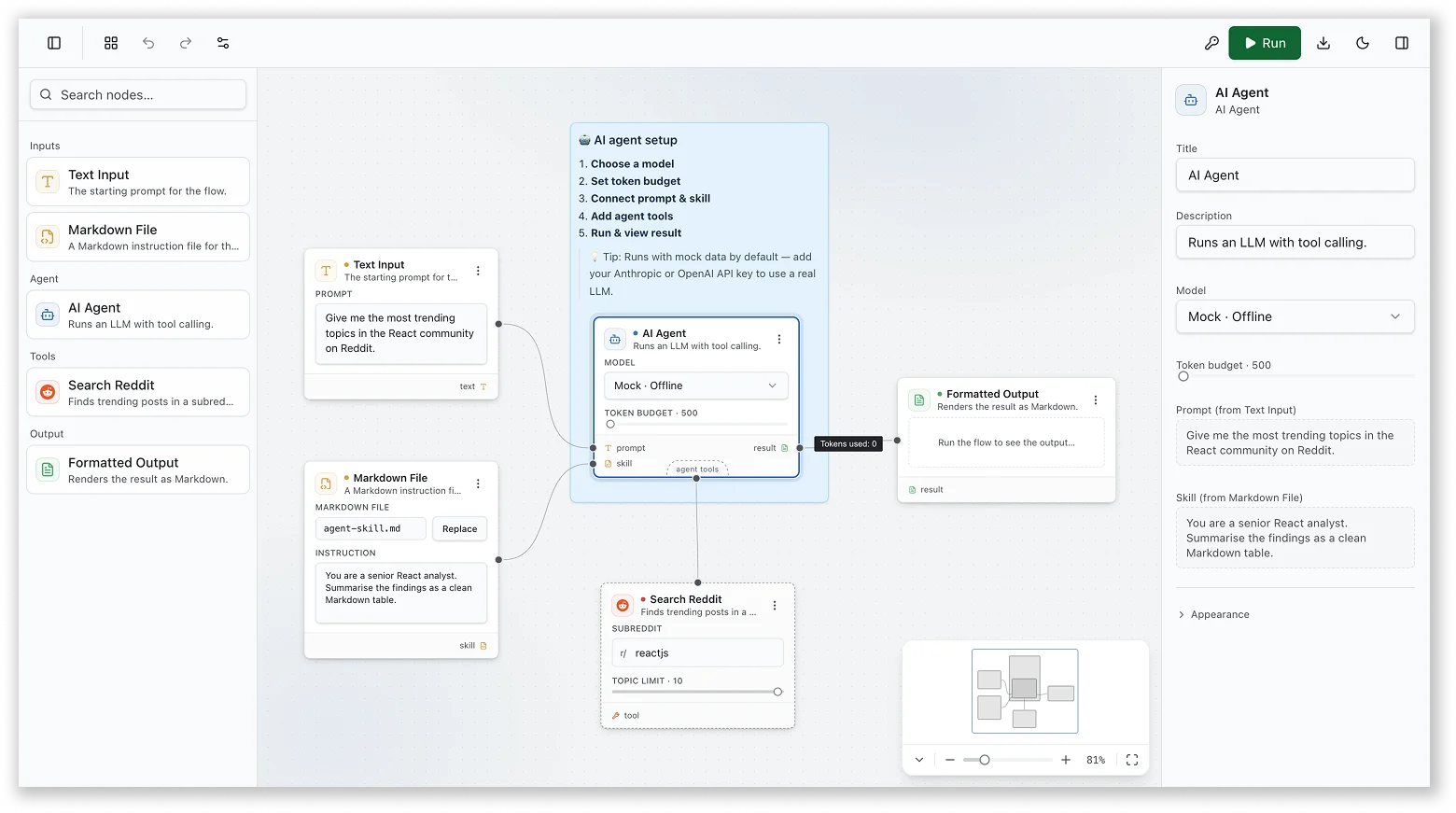
👉 Explore the demo app with source code
4.3 brings JointJS+ distribution and tooling up to date:
JointJS+ now ships via npm — Instead of downloading a ZIP package and wiring it into your project manually, you install JointJS+ through your package manager like any other dependency (the ZIP workflow remains available if you prefer it). This changes more than the install step: upgrades become predictable, dependencies are managed properly, CI/CD pipelines work without custom steps, and new developers on your team can get a working setup in minutes. npm access is included with an active update subscription; installation instructions are in the customer portal.
Tree shaking — @joint/core and @joint/plus now ship ES module entry points and sideEffects configuration, so bundlers like Webpack, Rollup, and Vite can eliminate unused exports and reduce your bundle size.
A dedicated repository for JointJS demos — All JointJS example projects now live in one place: clientIO/joint-demos. The repository contains example projects demonstrating various use cases and integrations — Angular, React, and other frameworks — organized into separate folders for easy navigation.
@joint/cli — a new command-line tool for browsing and scaffolding JointJS example projects. List available demos and download any of them into a local directory, no need to clone the entire repository:
# Browse available examples
npx @joint/cli list

# Download a named example into a local directory
npx @joint/cli download kitchen-sink/js my-app
Combined, you can go from browsing examples to a running local project in two commands.
Export got better, too. A new mode collects all computed styles — pseudo-selectors included — and inlines them directly into the exported SVG, so your export looks exactly as it does in the browser, no custom stylesheet required. It's fast; the trade-off is a larger SVG, though the extra size only affects SVG output, since rasterizing to PNG bakes the styles into pixels and nothing carries over. And with the new embedFonts option, even text matches out of the box.
Magnets and highlighters have so far been an SVG affair. In 4.3, HTML elements can play both roles: you can connect links directly to HTML rendered inside your elements, and apply highlighters to those same HTML nodes.
If your elements render rich HTML content — forms, lists, custom UI inside a <foreignObject> — you can now build diagram interactions around that HTML instead of maintaining a parallel SVG structure for it.
If your team builds in Angular, your diagram elements can now be regular Angular components — built, styled, and tested the way you're used to. A new tutorial and example application show how to render Angular components inside JointJS element views, so element content is defined in component templates rather than diagram-specific markup.
The pattern goes beyond just displaying a component. The custom element view manages the full component lifecycle: it creates the component, keeps it in sync in both directions, and destroys it when the element is removed. Highlighters, ports, and element tools keep working as usual, so your diagram elements gain Angular's dependency injection, reactive forms, and change detection without giving up any JointJS features.
👉 Follow the step-by-step tutorial or explore the live app with source code
Four new example applications ship with this release. Their source code is available in the JointJS demos repository, alongside all our other examples.
A genogram is an extended family tree diagram used in medicine, psychology, and social work. Beyond basic lineage, genograms encode additional information through standardized symbols: males as rectangles, females as ellipses, deceased persons marked with an X, adopted persons shown with brackets. This app uses JointJS with the @joint/layout-directed-graph package to automatically lay out multi-generational family data.
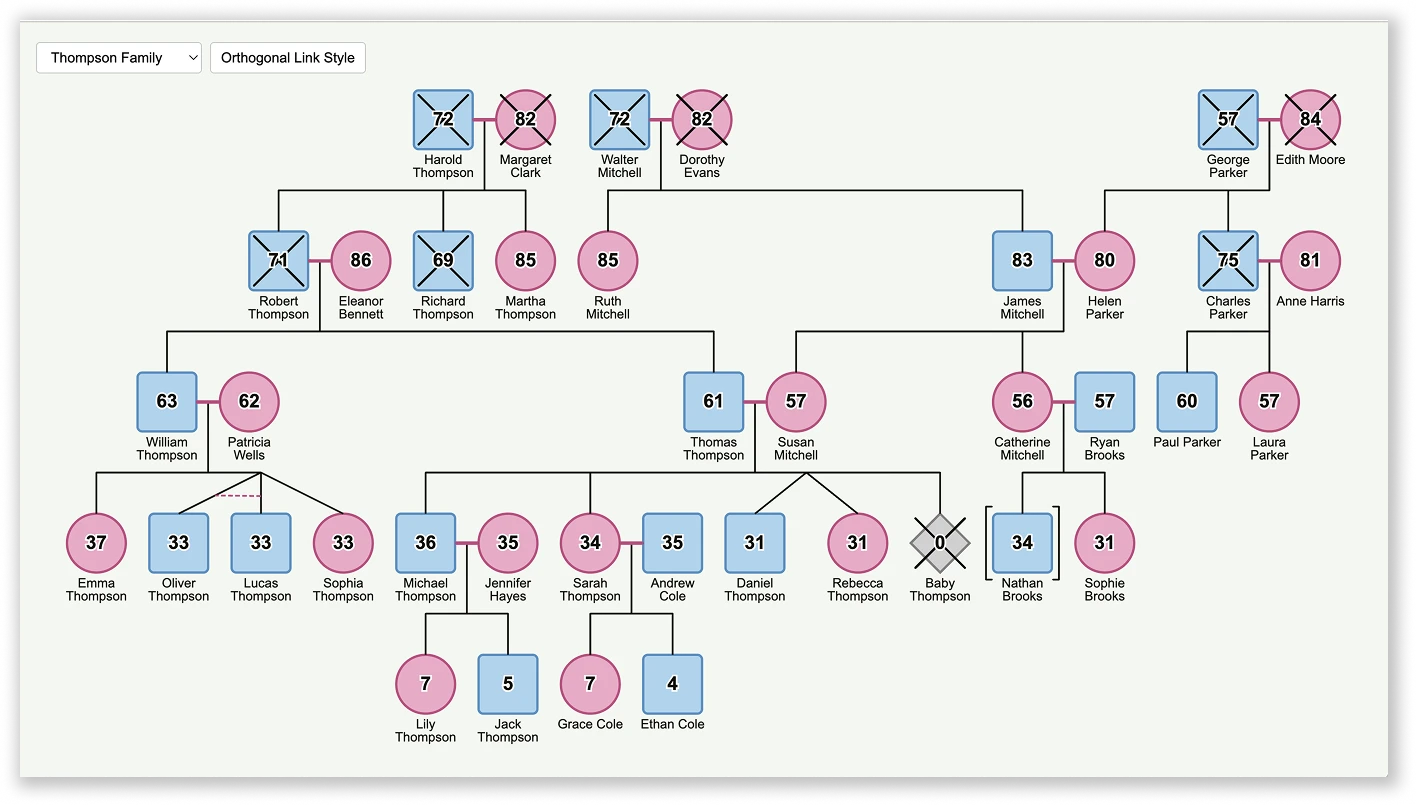
👉 Explore the live app with source code or read our tutorial on building a genogram app
A small data-mapping application built from elements that render HTML inside a <foreignObject>. A form element has a port directly under each of its fields; input and output interfaces are lists of items with a port next to each row. Port coordinates are measured from the rendered HTML, so they stay aligned with the content regardless of the layout. Values propagate along the mapping links: from the input interface into the form's fields, through computed fields, and on to the output.
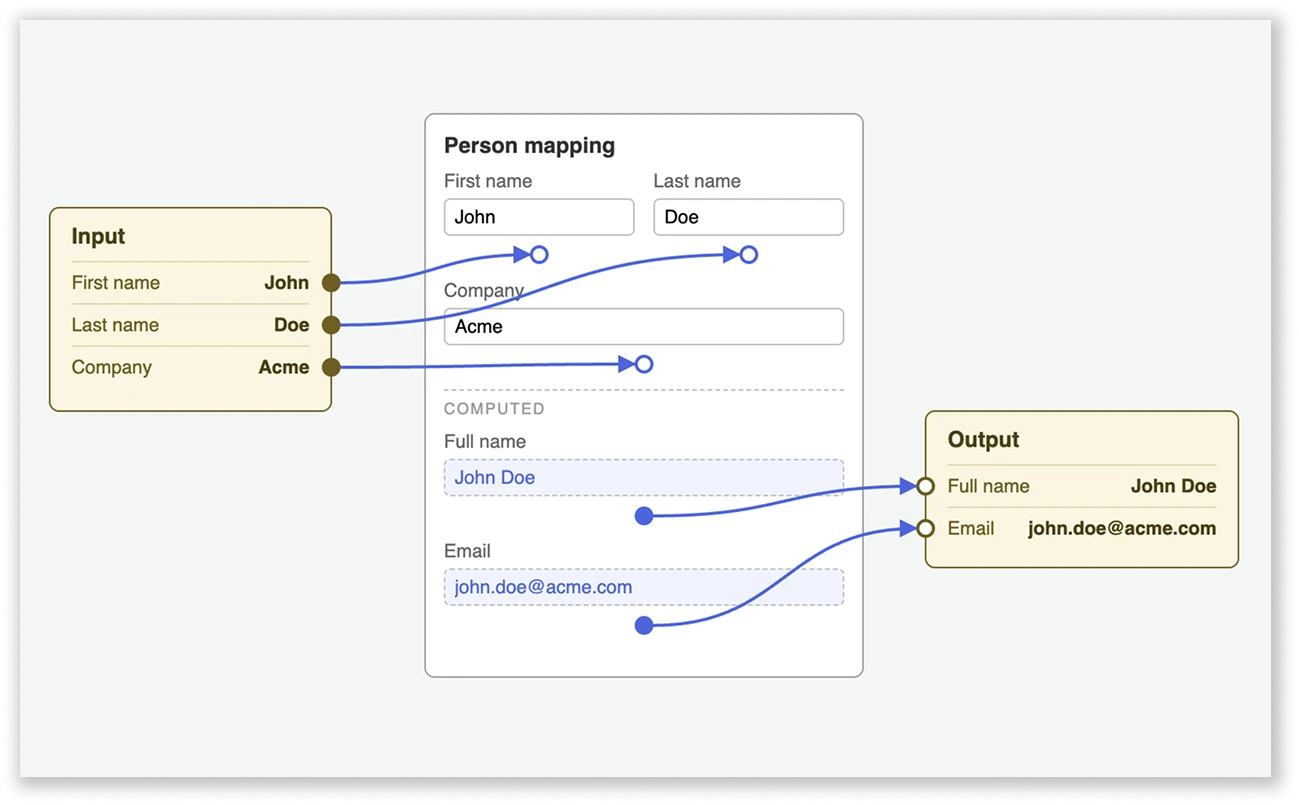
👉 Explore the live app with source code
A boilerplate for modeling microservices — services, databases, and groups nested in containers. When several of a group's children link out, the links collapse into one, so the group acts as an abstraction layer showing where connections go at a high level. To reveal an individual link's real target, take the child out of its container.
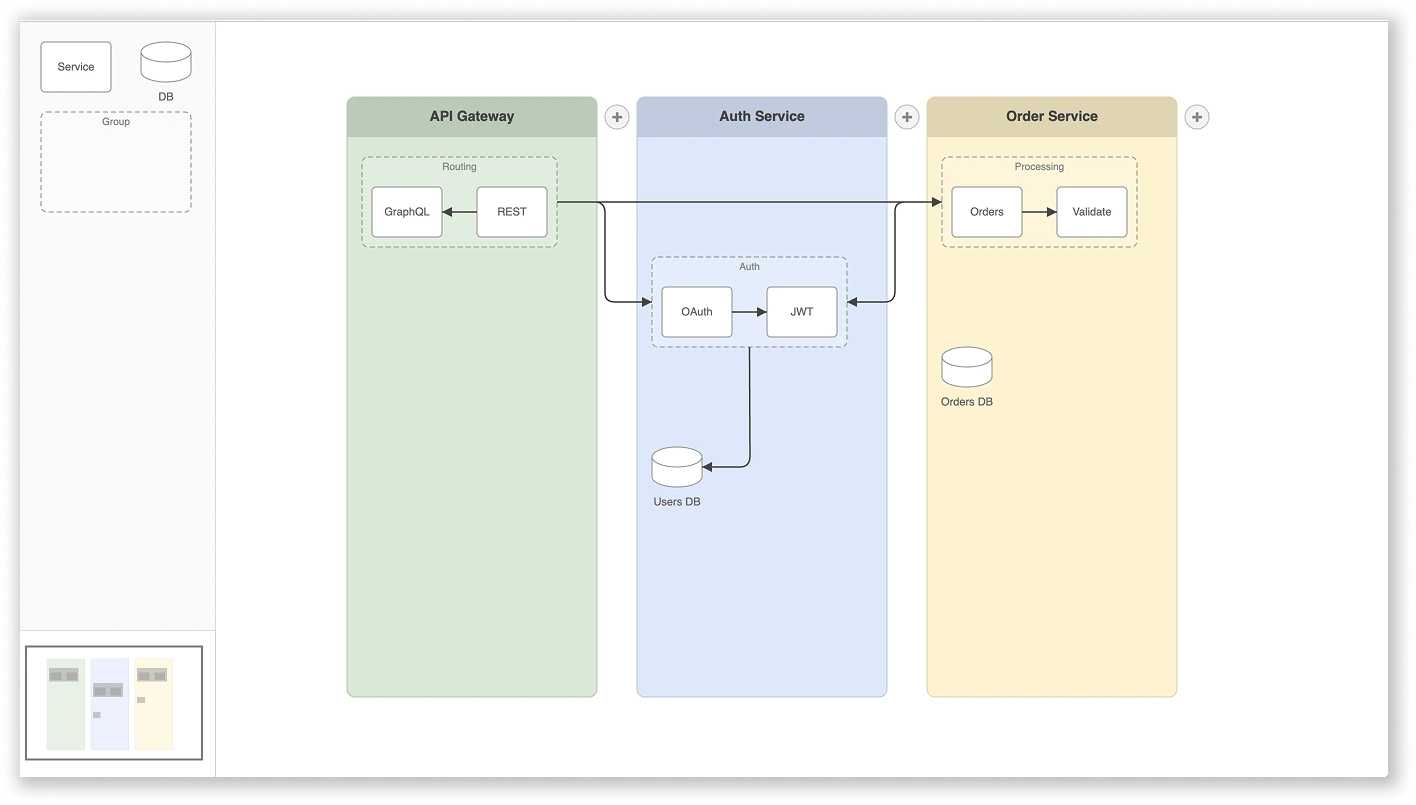
👉 Explore the live app with source code
We've highlighted the key updates in 4.3, but there's plenty more: the Navigator component is now responsive; selection handles and groups can be defined the same way as with Halo; connected links for a specific port can now be retrieved in a single command; and Paper and Graph events have better type support.
Want to shape what comes next? Share your ideas for new features and improvements on our GitHub and influence what the next JointJS and JointJS+ versions will look like.
Happy diagramming! 🙌


.png)